¶ Navigation
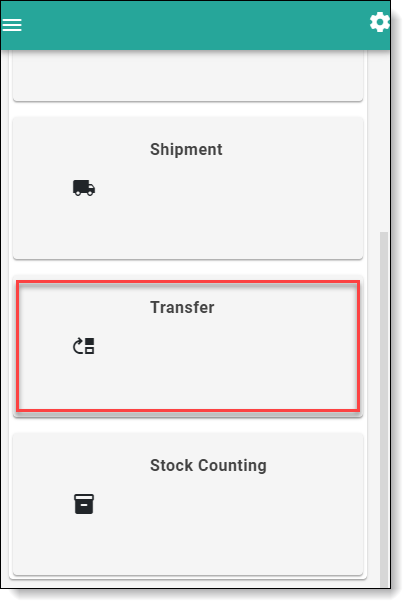
- User has to login to FreshLot and proceed to main menu. On the main menu, user has to click on Transfer button to proceed for Transferring functions. Picture on which button to click is provided bellow:
- To start the Transfer process, user needs to start off by scanning a bin code, enter it manually or select from the list.
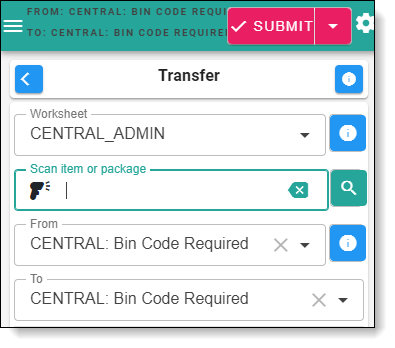
- After bin code was selected, the system will populate that bin as From Bin Code
Item transfer screen
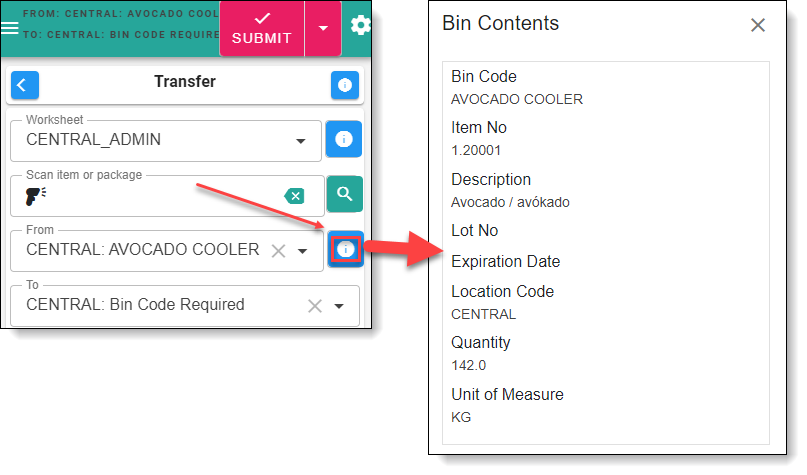
- For more detailed information, user can click the Info icon to view all the contents in the selected Bin Code
- User can now choose which items should be moved to a new bin by scanning the Item Label.
Item transfer
- Once all Items are added/scanned to the list, user will have to scan the Bin Code and select it as "Bin To" code - this will be the bin code where items will transferred.
freshlott10.png
Information data in brackets for item transfer
- After required fields are entered, user can then proceed to complete the Transfer process by clicking Send in the top right of the panel.
Transferring a Bin
- User has to start off by scanning the Bin Code or enter it manually.
Bin transfer
- Once the Bin Code is populated, user can then transfer all the items located in the Bin to a new one by clicking the "To Bin Code" field and scanning the appropriate Bin Code.
To bin code
2.1 If you instead choose to move the entire Bin to a different location, select the drop-down list for the "Location Code" and choose the appropriate location. After You can proceed to complete the transfer by hitting "Send".
Location code selection
- Once both "From Bin Code" and "To Bin Code" fields are populated, You can proceed to complete the transfer by hitting "Send".
Use Case Diagram
Transfer Use Case diagram
Users navigation in transfer
After successful login, user will be redirected to main menu page from which he will need to click on transfer button. After proceeding further with transfer function, user will land on page with a search field. User will input data into search field and system will validate if its an existing item, or a bin code. If its an item, user will land to a item transfer page and he will see the following fields: From Bin Code, Lot no., To Bin Code., Quantity to Transfer., UOM., Expiration date, To Location Code. User will need to choose from which bin code he will would like to transfer required item. After Item bin code selection, user will need to select Lot No., depending on Lot No., expiration date will populate itself automatically. Depending if user wants to transfer items to bin code or location, he will need to choose between those 2, because selection of one is not possible. After selection, user will need to populate transfer quantity - what is the transfer quantity that needs to be done and UOM - Unite of measure of items. After completing these steps, user can click on send button and item will be transferred to Bin\Location.
If user would like to transfer a bin code, he would need to input the bin code to the search field. After putting the bin code to the search field, system would validate if the bin code actually exists in the system. If the validation successful, user will be redirected to a new screen with field ‘From Bin Code’ populated already and 2 other fields. User will need to choose if the wants to transfer bin code to a bin code or to a location code, system does not allow 2 simultaneous selections. After selection, user must click on send button to proceed with the transfer.