¶ Device preparations
In this section we detail steps needed to be taken for the solution to work correctly.
¶ Attaching ethernet module
This section details steps to take to attach the ethernet module
- Follow the offical guide to attach the ethernet extension: here.
- Connect the device to ethernet socket.
- Power on the device.
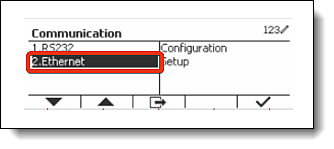
- Navigate to
Menu->Communication. - Validate that you can now see
Ethernetoption in this view.
If the option is not visible consult with Tenging support team to identify the issue.
¶ Setting Data to be sent on Demand
This is a crutial step for the solution of freshlot as it depends on the device being set to data assignment on web request demand.
Follow the steps
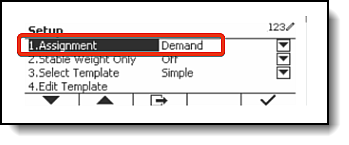
- Navigate to
Menu->Communication->Ethernet->Setup. - Change
Assignmentvalue toDemandvalue.
¶ Share the IP address with Tenging team
At this stage if you opt in for Tenging team make the final setup step do the following:
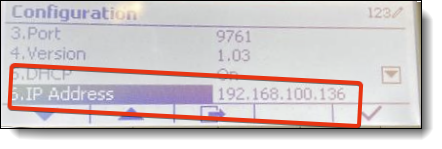
- Navigate to
Menu->Communication->Ethernet->Congifuration. - Note down the value of
IP Addressfield.
- Send an email to
support@tenging.iswith the following request:
Enable new OHaus Defender scales to be used in freshlot solution:
Store: **Store Name** (Paste actual store name)
IP Address: 127.0.0.1 (Paste actual IP address of the value found in the device)
Departments:
Aside of software functions, hardware plays important part in the receiving and production processes - so what hardware is configured with FreshLot?
- To minimize the impact of surroundings, environment-proof industrial computers has been configured with the app. With its sealed circuits, waterproof design and washable surface, performance of your receiving terminal will not be affected even in toughest working conditions.
- Floor and table scales are designed to work seamlessly with Zebra printer for quicker receiving processing of items of any shape and size.
- Barcode readers covering all applications and environments throughout the supply chain.
- Handheld computers for scan-intensive application.
Recommended hardware
Mobile device
- Zebra TC21
- Zebra TC26
Label printers
- Zebra ZT411 Thermal Transfer Industrial
Digital Scales
- Defender 5000 series industrial scale with Ethernet interface